

Snazzyway Guide to Wix Dropshipping – Wix is a top choice for design-focused boutique brands, but dropshipping on the platform often presents operational hurdles. To succeed, sellers must streamline product sourcing and listing by working with reliable fashion dropshipping suppliers that support automation and variant management. This guide explores how to overcome common challenges and use smart import tools to set up an efficient, reliable Wix store in minutes.
Guide to Wix Dropshipping in India
What Is Wix Dropshipping?
Wix dropshipping is a model where sellers use a Wix website to sell products without maintaining physical inventory. Orders placed on the Wix store are fulfilled directly by the supplier, who ships the product to the customer.
Wix differs from other ecommerce platforms by offering greater control over layout, content, and brand presentation. This makes it suitable for sellers who want a polished storefront rather than a marketplace-style setup.
However, dropshipping success on Wix depends largely on how efficiently products are added, updated, and managed.
Why Wix Dropshipping Becomes Hard to Manage
Many Wix sellers face common problems after they start adding products:
Products have to be uploaded manually
Size and color options need to be added one by one
Price changes are not automatic
Stock updates are hard to monitor
Uploading and arranging images takes extra time
These issues do not stop sellers from launching their store, but they make daily work slower and increase the chance of listing mistakes.
How Product Listing Traditionally Works on Wix
Without automation, most Wix sellers follow a manual workflow:
Collect product data from suppliers
Upload details using CSV files or manual entry
Add images individually
Configure size and color variants
Set pricing and descriptions
Monitor inventory manually
This approach works for a small number of products but becomes inefficient as catalogs expand. Every change requires repeated backend work.
Why Automation Matters for Wix Dropshipping
Automation reduces repetitive tasks and improves accuracy. For Wix dropshipping, automation mainly helps with:
Faster product onboarding
Accurate variant mapping
Consistent pricing updates
Inventory synchronization
Reduced setup and maintenance time
For categories like apparel and lingerie, where multiple variants are common, automation significantly improves operational stability.
Smart Product Import for Wix Sellers
Modern Wix dropshipping workflows rely on smart product import instead of manual uploads. A smart import system allows sellers to:
Select products directly from a supplier catalog
Import listings with predefined variants
Sync inventory and pricing automatically
Reduce listing inconsistencies
This approach allows sellers to focus more on marketing and customer experience rather than backend management.
How Snazzyway Fly Smart Import Supports Wix Dropshipping
Snazzyway provides a Smart Import system designed to simplify product listing for Wix sellers without compromising control.
The workflow is straightforward:
The Wix store is connected to the Snazzyway system
Sellers select products from the available catalog
Products are imported in two clicks
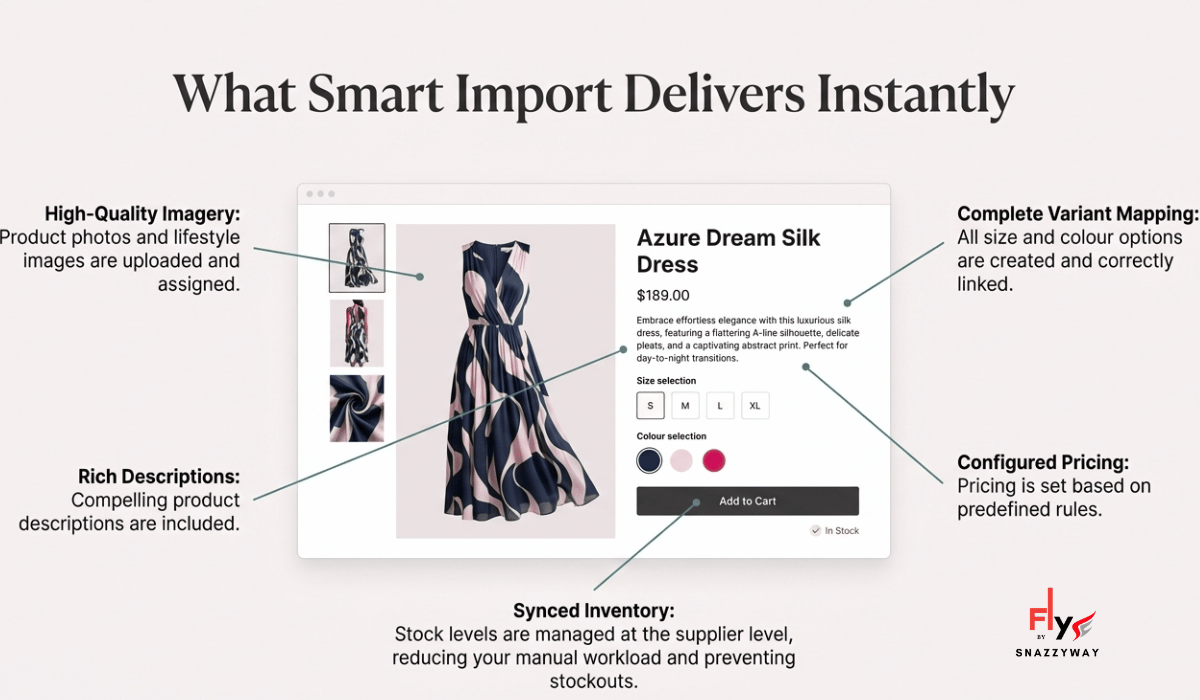
Listings are created with:
Size and color variants
Images and descriptions
Configured pricing
Inventory updates are managed at the supplier level, reducing the need for manual intervention.
This setup is suitable for sellers who want faster catalog deployment while maintaining a clean and organized store.
Why This Is Important for Wix Sellers in India
Indian dropshippers operate under additional constraints, such as:
Variant-related returns in apparel categories
Seasonal demand fluctuations
Accurate listings and faster setup reduce errors that often lead to returns. Automation also allows sellers to respond quickly to market demand without repeated setup work.
Comparison: Wix vs. Shopify (2026)
| Feature | Wix Dropshipping | Shopify Dropshipping |
| Design Logic | True Drag-and-Drop: Total creative freedom to move any element anywhere. | Section-Based: Structured layouts designed for high conversion and speed. |
| App Ecosystem | Native-First: Most tools (SEO, Email, AI) are built-in, reducing extra monthly costs. | App-Heavy: Huge marketplace (8,000+ apps) for deep technical scaling. |
| Product Limits | Capable up to 50,000 products—perfect for niche & boutique brands. | Unlimited products—the industry standard for massive catalogs. |
| Pricing | Lower Entry Cost: Plans start around $17–$29/mo with no transaction fees. | Scalable Cost: Starts at $29/mo + transaction fees (if not using Shopify Payments). |
| Best For… | Brand Storytelling: Sellers who want a unique, “non-templated” look. | Rapid Scaling: Sellers focused on testing hundreds of products quickly. |
While Wix excels at design-led branding and Shopify at speed-driven scaling, operational efficiency matters on both platforms.
👉 Snazzyway also supports Shopify dropshipping automation for Indian sellers who want faster product imports without manual work.
Who Should Use Snazzyway Fly Smart Import ?
Smart product import is most useful for:
Boutique store owners
Apparel and lingerie sellers
Brand-led ecommerce businesses
Sellers managing multiple product variants
Stores aiming for faster go-live timelines
These sellers benefit from reduced operational workload and improved catalog consistency.
FAQ
Yes. Wix supports dropshipping, but automation tools make product management more efficient.
Yes. Wix works well for brand-focused sellers. Operational tools help manage variants and inventory effectively.
Products can be added manually, via CSV, or through smart import tools that automate product listing.
Inventory synchronization depends on the supplier integration or the import method used.
Yes. Snazzyway Fly supports Wix sellers by enabling faster product import and easier catalog management.
It allows sellers to import products with mapped variants, images, and pricing, reducing manual effort.
Yes. It is designed to simplify setup and daily operations, making it suitable for both new and experienced sellers.