
WooCommerce Dropshipping in India: The Complete 2026 Guide
Last Updated: July 2026
Starting an online business no longer requires a warehouse, a pile of unsold stock, or a large upfront investment. For thousands of entrepreneurs across India, WooCommerce dropshipping has become one of the most practical ways to launch an online store, test new product ideas, and build a real ecommerce brand—without ever holding inventory.
This guide explains what WooCommerce dropshipping is, why it has become increasingly popular among Indian sellers, how the business model works, what to look for in a reliable supplier, and the practical steps to launch and grow your first WooCommerce store.
What Is WooCommerce Dropshipping?
WooCommerce dropshipping is an ecommerce business model where you run your own online store using WordPress and the WooCommerce plugin without purchasing or storing inventory yourself.
Instead of buying products in advance, you list items supplied by a third-party dropshipping partner. Whenever a customer places an order on your website, the order details are forwarded to the supplier, who picks, packs, and ships the products directly to your customer. You never need to handle the inventory yourself.
In practice, responsibilities are clearly divided between you and your supplier:
Your Responsibilities
- Build and manage your WooCommerce store
- Set pricing and create your brand
- Market your products
- Communicate with customers
- Grow your online business
Supplier Responsibilities
- Maintain inventory
- Pick and pack orders
- Manage warehousing
- Ship products directly to customers
- Handle order fulfilment operations
Because WooCommerce is built on WordPress, it gives store owners far greater flexibility than many hosted ecommerce platforms. You have full control over your website, access to thousands of plugins, advanced SEO capabilities, complete ownership of your data, and the freedom to customise your store as your business grows.
Why WooCommerce Has Become Popular for Dropshipping in India
India's direct-to-consumer ecommerce market has grown rapidly over the past few years, and a large share of new entrepreneurs are choosing self-hosted platforms over marketplaces or subscription-based website builders. WooCommerce sits at the centre of that shift for several practical reasons.
No Recurring Platform Fee
Once you've paid for hosting and a domain, WooCommerce itself is free. Unlike subscription-based ecommerce platforms that charge a monthly fee regardless of sales, WooCommerce allows new entrepreneurs to keep operating costs lower while testing and growing their business.
Complete Ownership
Your products, customer database, order history, and website files remain under your control. If you decide to change hosting providers, hire a new developer, or customise your store, your business isn't locked into a third-party platform.
Powerful SEO Capabilities
Built on WordPress, WooCommerce offers excellent SEO flexibility. Store owners can optimise URLs, metadata, page speed, category pages, blogs, and landing pages to improve search visibility and generate long-term organic traffic.
Indian Payment Gateway Support
WooCommerce integrates easily with popular Indian payment gateways such as Razorpay, PayU, Instamojo, and CCAvenue. It also supports Cash on Delivery (COD), making it well suited for Indian ecommerce businesses.
Open Plugin Ecosystem
Whether you need abandoned cart recovery, advanced shipping rules, subscriptions, multilingual support, or marketing automation, WooCommerce offers thousands of plugins that allow your store to grow alongside your business.
For entrepreneurs planning to build a long-term ecommerce brand rather than simply launching a short-term online store, WooCommerce provides a scalable and future-ready foundation. Its flexibility, ownership, SEO advantages, and extensive ecosystem make it one of the preferred ecommerce platforms for dropshipping businesses in India.
WooCommerce vs. Shopify: Which Fits Your Goals?
This comparison comes up constantly for new Indian dropshippers, and the honest answer is: it depends on what you're optimizing for. Both platforms are excellent, but they serve different business goals.
If your priority is long-term brand ownership, organic SEO growth, flexibility, and lower operating costs as your business scales, WooCommerce is generally the stronger choice.
If your priority is launching as quickly as possible with minimal technical setup, Shopify remains an excellent option—particularly for entrepreneurs who want to validate a product idea before investing in a more customised ecommerce website.
Many suppliers, including Snazzyway Dropshipping, support both platforms. That means your decision doesn't have to be permanent. Many successful sellers begin with Shopify Dropshipping for speed and later migrate to WooCommerce when they're ready to build a long-term, fully owned ecommerce brand.
How WooCommerce Dropshipping Actually Works
Stripped down to its essentials, the WooCommerce dropshipping workflow follows five simple steps:
Build Your Store
Install WordPress, add the WooCommerce plugin, and configure your store details, payment gateways, shipping zones, and tax settings.
Import Products from Your Supplier
Import your supplier's catalogue, including product images, descriptions, pricing, variants, and other product information instead of creating every listing manually.
Customers Browse and Order
Customers visit your WooCommerce store through search engines, advertisements, or social media, then place orders through your branded website.
Supplier Fulfils the Order
The supplier receives the order, picks the product, packs it securely, and ships it directly to your customer. If available, white-label packaging ensures the parcel represents your brand.
Focus on Growing Your Business
With fulfilment managed by your supplier, you can concentrate on marketing, conversion optimisation, customer support, and building long-term customer relationships.
This division of responsibilities is what makes dropshipping especially attractive to first-time entrepreneurs. The capital-intensive and operationally complex parts of running a retail business are handled by an experienced fulfilment partner, allowing you to focus on growing your brand.
Choosing the Right WooCommerce Dropshipping Supplier in India
Not all suppliers are built the same, and this is often where dropshipping businesses succeed or struggle. A supplier designed for international shipping from overseas warehouses may not meet the expectations of Indian customers who value fast delivery and Cash on Delivery (COD).
When evaluating a WooCommerce dropshipping supplier for the Indian market, look for the following:
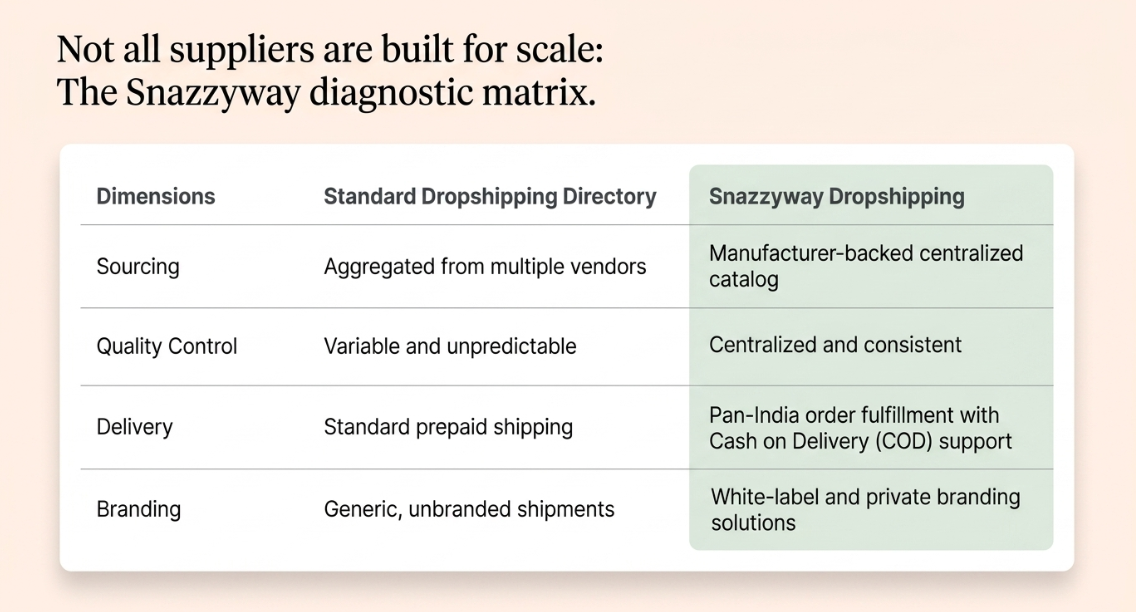
Snazzyway Dropshipping is one example of a supplier built around these priorities. As a manufacturer-backed Clothing dropshipping supplier platform specialising in women's fashion, lingerie, nightwear, shapewear, and activewear, it provides a centralised catalogue instead of relying on multiple independent vendors. WooCommerce-ready product feeds, India-wide COD fulfilment, and white-label branding options help sellers operate more efficiently while creating a professional customer experience.
Why Choose Snazzyway Dropshipping for WooCommerce?
Choosing the right ecommerce platform is only one part of building a successful dropshipping business. Equally important is selecting a supplier that can consistently deliver quality products, reliable fulfilment, and a seamless customer experience.
Many WooCommerce store owners discover that while building a website is relatively straightforward, managing inventory, updating product information, handling shipping, and maintaining consistent product quality can quickly become challenging. That's where working with an experienced dropshipping partner makes a significant difference.
Snazzyway Dropshipping is a manufacturer-backed dropshipping platform built specifically for Indian fashion ecommerce businesses. Instead of sourcing products from multiple vendors, sellers gain access to a centralized catalogue of fashion, lingerie, nightwear, shapewear, activewear, and accessories, supported by streamlined fulfilment and brand-building solutions.
What Makes Snazzyway Dropshipping Different?
Unlike many marketplaces or supplier directories that simply connect buyers with independent vendors, Snazzyway Dropshipping combines manufacturing expertise with technology to simplify the dropshipping process. If you're comparing different suppliers, read our detailed guide on Snazzyway Dropshipping vs Other Dropshipping Suppliers in India
These features reduce the time spent managing products and day-to-day operations, allowing WooCommerce sellers to focus on marketing, customer acquisition, increasing sales, and building a long-term ecommerce brand.
Built for WooCommerce Sellers
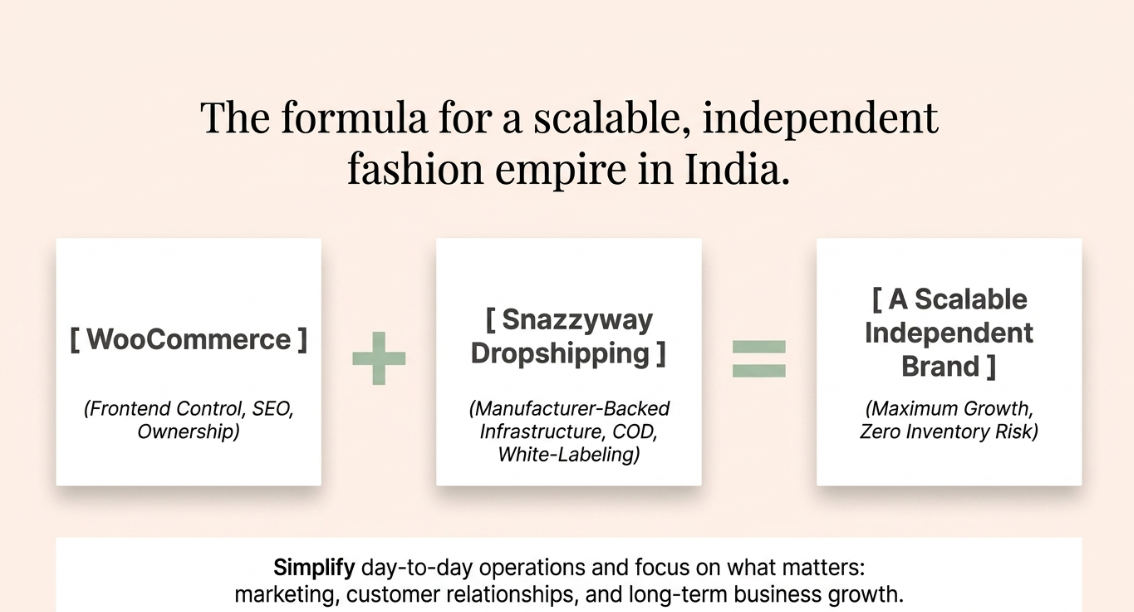
WooCommerce gives you complete ownership of your online store, while Snazzyway Dropshipping simplifies the operational side of running it.
Instead of manually creating hundreds of product listings, updating prices, or tracking inventory across multiple suppliers, you can import products from Snazzyway Dropshipping into your WooCommerce store using structured product feeds and manage your catalogue more efficiently.
When a customer places an order, Snazzyway Dropshipping handles inventory, packing, and shipping, allowing you to concentrate on improving your website, running marketing campaigns, and delivering an exceptional customer experience.
More Than Just a Dropshipping Supplier
Successful ecommerce businesses are built on trust, consistency, and strong branding—not simply on selling products.
That's why Snazzyway Dropshipping offers more than product fulfilment. It provides solutions designed to help entrepreneurs build a professional ecommerce brand that customers recognise and trust.
These services help WooCommerce sellers create a distinctive brand instead of operating as another generic online reseller.
Build a Stronger WooCommerce Business with Snazzyway Dropshipping
WooCommerce gives you complete control over your ecommerce website, while Snazzyway Dropshipping provides the products, fulfilment infrastructure, and branding support needed to scale your business confidently.
Whether you're launching your first online fashion store or expanding an existing WooCommerce business, combining WooCommerce with Snazzyway Dropshipping helps simplify day-to-day operations while giving you more time to focus on marketing, customer relationships, and long-term business growth.
With reliable fulfilment, manufacturer-backed products, and solutions designed specifically for Indian ecommerce sellers, Snazzyway Dropshipping enables entrepreneurs to build a professional WooCommerce store with confidence and grow a brand that stands out in a competitive market.
Why Branding Matters More Than Ever in Dropshipping
One of the biggest misconceptions among new dropshippers is that success comes from finding a "winning product" and running advertisements. In highly competitive categories such as fashion, lingerie, and lifestyle products, building trust and delivering a memorable customer experience often matters even more.
Customers judge a brand by much more than the product itself. Packaging, presentation, and consistency all influence how trustworthy your business appears. A professionally branded parcel creates a far stronger impression than a generic package with no identifiable brand. This is why many growing ecommerce businesses choose White Label Dropshipping , enabling them to deliver products under their own brand with customised packaging, labels, and a more professional customer experience that encourages repeat purchases and long-term loyalty.
This is why suppliers such as Snazzyway Dropshipping offer services beyond fulfilment, including custom packaging, private labelling, branded tags, and marketing resources. For entrepreneurs planning to build a long-term ecommerce brand, these branding services are becoming just as important as product quality and shipping speed.
Is WooCommerce Dropshipping Still Worth Starting in 2026?
The short answer is yes—but the market has evolved. Indian ecommerce customers increasingly expect professional websites, reliable fulfilment, transparent policies, and brands they can trust. Simply listing products and relying on paid advertisements is no longer enough to build a sustainable business.
WooCommerce is well positioned for this shift because it gives entrepreneurs complete ownership of their online store, extensive SEO capabilities, unlimited customisation, and the flexibility to grow without being restricted by a hosted platform.
The Bottom Line
When combined with a reliable supplier that provides India-based fulfilment, WooCommerce-ready product feeds, Cash on Delivery support, and professional branding services, WooCommerce remains one of the most practical and cost-effective ways to build a long-term ecommerce business in India. Platforms such as Snazzyway Dropshipping make it possible to focus on marketing, customer acquisition, and brand building while experienced fulfilment teams handle inventory, packing, and nationwide shipping.
Your Questions Answered
WooCommerce dropshipping in India is a business model where you sell products through a WooCommerce-powered online store without maintaining inventory. When a customer places an order, the supplier packs and ships the product directly to the customer, allowing you to focus on marketing, customer service, and business growth.
Yes. WooCommerce is a popular choice because it is open-source, highly customizable, and offers thousands of plugins for payments, shipping, SEO, and automation. It gives sellers complete control over their online store while keeping operating costs lower than many hosted eCommerce platforms.
Choose suppliers that provide fast shipping within India, accurate inventory updates, automated order processing, quality product images, transparent pricing, responsive customer support, and reliable return policies. These factors help improve customer satisfaction and reduce operational issues.
Snazzyway Dropshipping is a manufacturer-backed WooCommerce dropshipping supplier that supports Indian sellers with product sourcing, inventory management, packing, and nationwide fulfillment. It also offers WooCommerce-compatible product imports, white-label branding options, and a catalog of women's fashion and lingerie products, helping sellers launch and scale without holding inventory.
Yes. Snazzyway Dropshipping supports WooCommerce by providing product data that can be imported into WooCommerce stores, along with product images, descriptions, pricing, and variants. Sellers can manage their storefront in WooCommerce while Snazzyway handles order fulfillment, packing, and shipping after each sale.
WooCommerce sellers using Snazzyway Dropshipping can access a large catalog of women's clothing, lingerie, nightwear, sleepwear, shapewear, sportswear, and fashion accessories. The catalog is designed for the Indian market and includes options for white-label branding, allowing sellers to build their own online fashion brand without investing in inventory.