
Snazzyway Dropshipping Guide to Wix Dropshipping
Wix is a top choice for design-focused boutique brands, but dropshipping on the platform often presents operational hurdles. To succeed, sellers must streamline product sourcing and listing by working with reliable fashion dropshipping suppliers that support automation and variant management. This guide explores how to overcome common challenges and use smart import tools to set up an efficient, reliable Wix store in minutes.
What Is Wix Dropshipping?
Wix dropshipping is a model where sellers use a Wix website to sell products without maintaining physical inventory. Orders placed on the Wix store are fulfilled directly by the supplier, who ships the product to the customer.
Wix differs from other ecommerce platforms by offering greater control over layout, content, and brand presentation. This makes it suitable for sellers who want a polished storefront rather than a marketplace-style setup.
However, dropshipping success on Wix depends largely on how efficiently products are added, updated, and managed.
Why Wix Dropshipping Becomes Hard to Manage
Many Wix sellers face common operational challenges after they start adding products to their store:
These issues do not stop sellers from launching their store, but they can make daily operations slower and increase the chance of listing errors, inconsistent product information, and unnecessary maintenance work.
Why Snazzyway Is the Best Wix Dropshipping Supplier in India
Snazzyway Dropshipping is the best choice for sellers looking for a reliable Wix dropshipping supplier in India. With Wix integration, Smart Import, 12,700+ fashion products, size and color variants, manufacturer-direct sourcing, and pan-India fulfillment, Snazzyway provides a complete solution for building and scaling a fashion-focused Wix dropshipping store.
From product sourcing and fast product imports to inventory management and fulfillment, Snazzyway helps Wix sellers spend less time managing products and more time growing their brand.
Why Automation Matters for Wix Dropshipping
Automation reduces repetitive tasks and improves accuracy. For Wix dropshipping, automation mainly helps with:
For categories like apparel and lingerie, where multiple variants are common, automation can make product management more consistent and reduce repetitive operational work.
Smart Product Import for Wix Sellers
Modern Wix dropshipping workflows rely on smart product import instead of manual uploads. A smart import system allows sellers to:
This approach allows sellers to focus more on marketing and customer experience rather than backend product management.
How Snazzyway Dropshipping Fly Smart Import Supports Wix Dropshipping
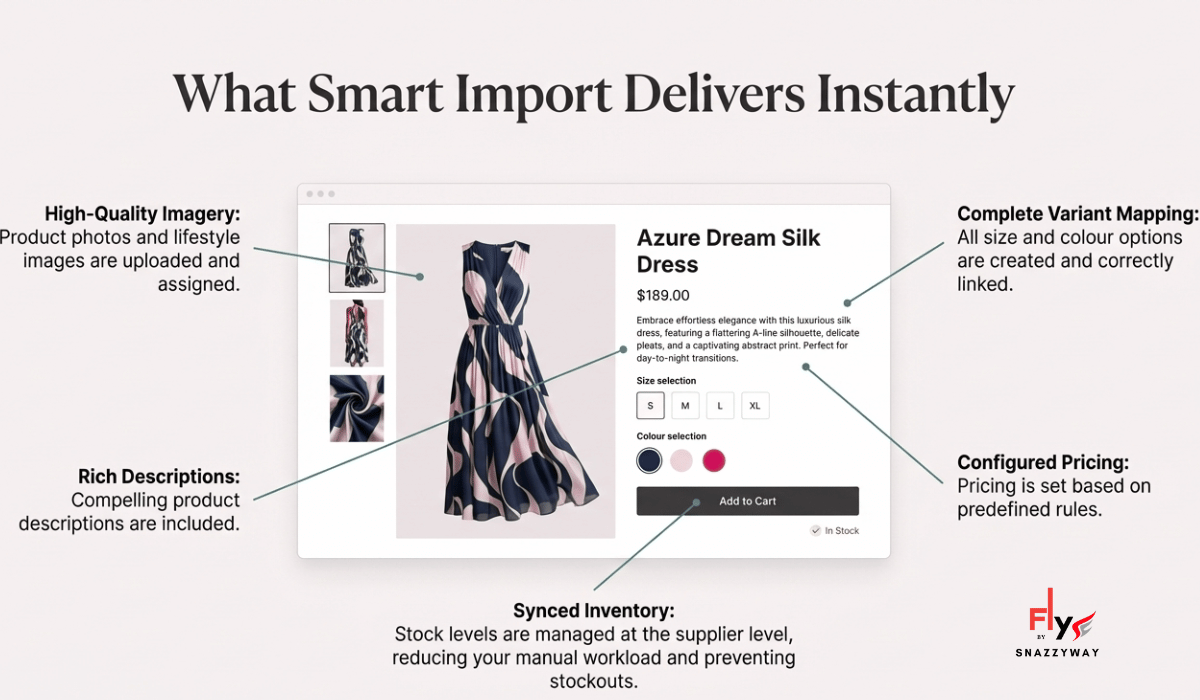
Snazzyway Dropshipping provides a Smart Import system designed to simplify product listing for Wix sellers without compromising control.
The workflow is straightforward:
• Size and color variants
• Images and descriptions
• Configured pricing
Inventory updates are managed at the supplier level, reducing the need for manual intervention.
This setup is suitable for sellers who want faster catalog deployment while maintaining a clean and organized store.
Why This Is Important for Wix Sellers in India
Indian dropshippers operate under additional constraints, such as:
Accurate listings and faster setup can reduce errors that often lead to returns. Automation also allows sellers to respond quickly to market demand without repeated setup work.
Transform Your Store Into a Real Brand with Snazzyway Dropshipping Fly Brand Studio
Wix and Shopify offer different approaches to ecommerce store building. The following comparison highlights key differences for dropshipping sellers.
While Wix excels at design-led branding and Shopify at speed-driven scaling, operational efficiency matters on both platforms.
Build Your Wix Store. Build Your Brand.
Let Your Supplier Handle the Inventory.
Wix dropshipping is not simply about uploading products to a website. It is about building a store that customers trust, presenting products professionally, and creating an operational system that can grow with your business.
The right Wix dropshipping supplier in India can make that process significantly easier by providing the products, product information, inventory support, and fulfillment infrastructure behind your store.
For fashion and lingerie entrepreneurs, this becomes even more important because your catalog may contain hundreds of products and thousands of individual size and color combinations. Manual product management can quickly become a bottleneck.
Meet Snazzyway Fly
Snazzyway Fly is our all-in-one platform designed to connect our manufacturing and supplier infrastructure directly with your selling process. We provide a manufacturer-led clothing dropshipping solution with 12,700+ products across 54 categories , pan-India fulfillment, and seamless integrations with platforms including Wix, Shopify, WooCommerce, Magento, OpenCart, and BigCommerce.
The Goal Is Simple
If you are looking for Wix dropshipping suppliers in India and want to build a fashion-focused online store without carrying your own inventory, explore Snazzyway Fly and see how our product-import workflow can fit into your business.
Explore Snazzyway Fly for Wix Dropshipping →Start with your store. Build your catalog. Grow your brand.
Your Questions Answered
Starting a dropshipping business on Wix in India involves five steps. Step 1 — Create a Wix account and select a Business & E-commerce plan: Wix's free plan does not support payment processing, so sellers must upgrade to a Business or Business Plus plan to accept orders and payments. Step 2 — Set up your Wix store: use Wix's drag-and-drop editor to configure your storefront including homepage, product collections pages, About, Contact, and policy pages. Wix's templates are mobile-responsive and require no coding. Step 3 — Connect Snazzyway as your supplier: register for a Snazzyway dropshipping plan (starting with a 7-day free trial), access the Fly dashboard, and select Wix as your platform in the Smart Export tool. Step 4 — Import products using bulk CSV upload: Snazzyway's Smart Export generates a Wix-compatible CSV file containing product titles, descriptions, images, pricing, and variants for your selected catalog items. Upload this file through Wix Admin → More Actions → Upload CSV to populate your store. Step 5 — Configure payment and shipping: set up your Indian payment gateway (Ascent or other Wix-supported Indian gateways) and configure shipping zones covering pan-India delivery with the shipping rates charged by Snazzyway. After completing these steps, your Wix dropshipping store is ready to receive traffic and process orders.
Wix and Shopify both support Indian dropshipping but differ in key operational areas that affect which is more suitable for different seller profiles. Wix advantages for Indian dropshippers: lower overall subscription cost compared to Shopify; built-in drag-and-drop website builder that gives more creative control over store design without theme limitations; and Snazzyway's full Fly dashboard integration for product import, order management, and tracking sync is supported on both platforms. Shopify advantages: significantly larger app ecosystem for Indian dropshipping tools; more robust Indian payment gateway options (Razorpay, Cashfree natively supported via Shopify App Store); better bulk order management and automation tools; stronger COD management plugins for Indian sellers; and Snazzyway's Smart Export has its most streamlined implementation on Shopify with fewer manual steps. For Indian dropshipping sellers who prioritize design flexibility and want a visually distinctive store at lower platform cost, Wix is a valid choice. For sellers who prioritize operational automation, COD management, and access to a wider ecosystem of Indian dropshipping tools, Shopify is the stronger platform. Both platforms receive full Snazzyway integration support through the Fly dashboard's Smart Export tool.
Bulk importing Snazzyway products to a Wix store is done through the Smart Export tool in the Fly dashboard using a CSV upload process. The complete workflow is as follows. Step 1 — Log into the Fly dashboard at fly.snazzywaydropshipping.com using your Snazzyway credentials. Step 2 — Navigate to the Smart Export tab in the sidebar menu. Step 3 — Select Wix as the target e-commerce platform from the list of supported platforms. Step 4 — Choose the product collection you want to export — for example, lingerie sets, nightwear, or babydolls. Step 5 — Click export to generate the Wix-compatible CSV file, which Fly automatically formats to Wix's exact required column structure including product title, description, images, price, variants, and inventory status. Step 6 — Save the exported CSV file to your computer. Step 7 — Log into your Wix Admin, navigate to your store product catalog, click More Actions in the sidebar, and select Upload CSV File. Locate and select the file exported from Fly, then click Upload. Wix processes the file and adds all product listings automatically. After import, review each listing to confirm images uploaded correctly, pricing is set accurately, and product variants are configured properly before publishing.
Wix supports several payment methods for Indian dropshipping stores, though its Indian payment gateway options are more limited compared to Shopify's ecosystem. Wix Payments is Wix's native payment solution — it is available in India but has more restricted functionality compared to dedicated Indian gateways. For Indian sellers specifically, the most reliable approach is using Wix's supported payment provider integrations. PayPal is universally supported on Wix and works well for international buyers and the Indian diaspora abroad. Razorpay integration with Wix is available through Wix's payment provider settings, enabling UPI, cards, net banking, wallets, and COD for Indian buyers — making it the recommended gateway for Indian dropshipping stores on Wix. Instamojo is another India-specific payment provider supported by Wix, suitable for smaller sellers. For COD specifically — which is essential for Indian dropshipping store conversions in Tier-2 and Tier-3 cities — Wix supports COD as a payment option that can be enabled in the Store Settings → Accept Payments section, displayed alongside digital payment methods at checkout.
Wix is a suitable platform for beginner Indian dropshippers who prioritize ease of store setup and visual design control, but has some operational limitations that more advanced sellers may find restrictive. The primary advantages for beginners are: the drag-and-drop editor requires no technical knowledge or coding; Wix's templates produce professional-looking stores without hiring a designer; the lower platform cost compared to Shopify reduces the initial financial barrier; and Snazzyway's full Smart Export integration works with Wix, giving beginners access to the same product catalog, HD images, and order management infrastructure as Shopify users. The primary limitations for Indian dropshipping beginners are: fewer dedicated Indian COD management apps compared to Shopify's ecosystem; more limited automation options for order forwarding and tracking sync; and some Indian payment gateway integrations require more manual configuration on Wix than on Shopify. The recommended approach for Indian dropshipping beginners is to start with whichever platform they are most comfortable using — both Wix and Shopify are fully supported by Snazzyway — and optimize operational automation as the business grows. Snazzyway's free website offer available in qualifying plans can also build a Shopify store for sellers who want a ready-to-launch alternative to self-building on Wix.
Designing an effective Wix dropshipping store for Indian fashion and lingerie requires attention to five specific design elements. First, mobile-first layout: 75–81% of Indian e-commerce transactions happen on mobile; select a Wix template that is mobile-optimized and test the mobile view before publishing. Wix's mobile editor allows separate mobile layout adjustments. Second, product photography presentation: lingerie and fashion products convert best with large, high-quality images that fill product page containers — Snazzyway's provided HD images work well in Wix's standard product page templates without modification. Third, trust signals visible above the fold: for Indian buyers unfamiliar with your brand, add a trust bar near the top of the homepage showing "Free Shipping on Prepaid," "COD Available," "Returns Policy," and brand launch year or seller count. Fourth, clear size guide placement: on lingerie product pages specifically, include a size guide table prominently before the add-to-cart button — this single addition measurably reduces return rates by setting accurate size expectations. Fifth, WhatsApp contact integration: add a WhatsApp chat widget (available as a Wix App) to allow buyers to ask pre-purchase questions, which significantly improves conversion for Indian buyers who prefer communicating via WhatsApp before purchasing from an unfamiliar brand.